Transform Photos into Art: A Complete Guide to the Brush Magic Portrait Painter Toolkit
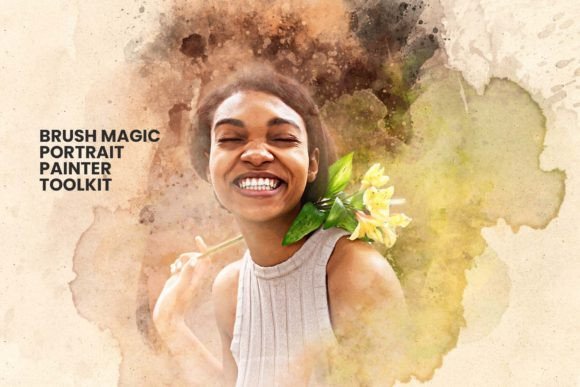
In the digital age, the boundary between photography and painting has become increasingly blurred. While traditional artists spend years mastering brushstrokes and color theory, modern technology offers a bridge that allows anyone to achieve stunning artistic results with minimal effort. Enter the Brush Magic Portrait Painter Toolkit, a revolutionary Photoshop action designed to transform ordinary photographs into breathtaking digital paintings with just a single click. This tool is not merely a filter; it is a comprehensive suite of resources that combines advanced photo effects with authentic watercolor art techniques, offering both professionals and hobbyists a new canvas for creativity.
Whether you are a photographer looking to add a unique flair to your portfolio or an enthusiast wanting to turn family snapshots into heirloom-quality artwork, understanding how this toolkit works can elevate your digital workflow. This guide will explore the features, benefits, and practical applications of the Brush Magic Portrait Painter Toolkit, helping you unlock its full potential without needing advanced technical skills.
The Evolution of Digital Painting Actions
To truly appreciate the value of the Brush Magic Portrait Painter Toolkit, one must first understand the concept of Photoshop actions. In the early days of digital editing, creating complex artistic effects required hours of manual labor—layering masks, adjusting curves, applying filters, and blending modes. Today, these processes have been streamlined into "actions," which are recorded sequences of steps that can be replayed instantly on any image.
However, many generic actions produce repetitive, artificial-looking results. The Brush Magic Portrait Painter Toolkit stands out because it mimics the organic nature of traditional media. Instead of simply blurring an image, it simulates the texture of paper, the flow of water, and the unpredictability of pigment. This distinction is crucial for users who want their work to feel hand-crafted rather than digitally processed.
Why Watercolor Effects Matter in Modern Design
Watercolor art evokes emotion, softness, and nostalgia. In a world dominated by high-definition, hyper-realistic imagery, the imperfection of watercolor provides a refreshing contrast. It humanizes subjects, making portraits feel more intimate and approachable. For businesses, this aesthetic is particularly valuable in branding, marketing materials, and social media content where standing out from the crowd is essential.
By integrating watercolor techniques into digital workflows, creators can:
- Enhance Emotional Connection: Soft edges and blended colors often resonate more deeply with viewers than sharp, clinical lines.
- Create Unique Brand Identity: Customizable artistic styles help brands distinguish themselves in saturated markets.
- Simplify Complex Workflows: Achieving professional-grade results quickly allows for faster turnaround times on projects.
Deep Dive: What’s Inside the Brush Magic Toolkit?
The true power of the Brush Magic Portrait Painter Toolkit lies in its comprehensive package. Unlike standalone filters, this toolkit is an ecosystem of files designed to work together seamlessly. When you download this resource, you aren't just getting a script; you are receiving a complete studio in a box.
Core Components and File Formats
The toolkit includes several specific file types that cater to different aspects of the creative process:
- Photoshop Action Files (.ATN): These are the heart of the system. They contain the pre-recorded steps that apply the painting effect. With one-click actions, the software automatically applies layers, adjustments, and blending modes to your photo.
- Custom Brush Files (.ABR): To ensure the effect looks authentic, the toolkit includes a variety of specialized watercolor brushes. These allow for fine-tuning details like hair strands, skin texture, and background elements after the initial transformation.
- Pattern Files (.PAT): These files provide textured backgrounds that mimic real paper grain or canvas, adding depth and realism to the final image.
- Color Adjustment Presets: The package includes 20 unique color adjustment options. This feature is vital for customization, allowing users to shift the mood of the painting from warm and nostalgic to cool and dramatic with ease.
User-Friendly Design for All Skill Levels
A common misconception about professional-grade Photoshop tools is that they require extensive training to use effectively. The Brush Magic Portrait Painter Toolkit challenges this assumption. It is explicitly designed to be user-friendly, ensuring that even beginners can achieve professional-looking results.
The interface relies on a logical structure where each layer remains fully editable. This means that if the automatic result isn't quite perfect, you don't have to start over. You can open the layers panel and adjust the opacity of specific paint strokes, change the color balance, or modify the texture intensity. This flexibility bridges the gap between automated convenience and manual control.
Step-by-Step Learning Resources
Education is a cornerstone of the Brush Magic experience. The toolkit comes with well-documented instructions and a helpfile that guides users through the installation and usage process. Furthermore, the inclusion of step-by-step video tutorials ensures that visual learners can follow along easily. These videos demonstrate not only how to apply the action but also how to tweak the settings for different lighting conditions and subject types.
For example, a tutorial might show how to handle a portrait taken in harsh sunlight versus one taken in soft indoor lighting. By watching these examples, users learn to anticipate how the tool reacts to various inputs, building their confidence and skill set over time.
Practical Applications: From Hobby to Business
The versatility of the Brush Magic Portrait Painter Toolkit makes it applicable across a wide range of scenarios. Its relevance extends far beyond personal hobbies, finding a significant place in modern business and education.
For Professional Photographers
Photographers often struggle to offer diverse products to their clients. While standard retouching is expected, offering a "digital painting" version of a portrait can be a lucrative upsell. Imagine presenting a wedding couple with both their traditional photos and a romantic, watercolor-style painting of their special day. This adds a unique value proposition to your services, setting you apart from competitors who only offer standard edits.
For Graphic Designers and Marketers
In the realm of graphic design, originality is currency. Using stock photos can sometimes feel generic. By transforming stock images or client headshots into artistic paintings using this toolkit, designers can create bespoke visuals for websites, brochures, and social media campaigns. The ability to customize every aspect of the painting ensures that the final output aligns perfectly with the brand's color palette and style guidelines.
For Educators and Students
In educational settings, this toolkit serves as an excellent introduction to digital art principles. Students can experiment with color theory, composition, and texture without the steep learning curve of traditional painting. It encourages experimentation and helps demystify the creative process, showing that art is accessible to everyone regardless of their background.
Common Misunderstandings Clarified
Despite its ease of use, there are a few assumptions users should be aware of before diving in. First, while the toolkit is powerful, it does not replace good photography entirely. The quality of the input image still matters. A blurry or poorly lit photo may not yield the best results, even with advanced actions. However, the toolkit is forgiving enough to salvage many imperfect shots, turning them into artistic abstractions where flaws become part of the style.
Secondly, some users assume that "one-click" means "no control." As mentioned earlier, the fully editable layers allow for deep customization. The action is a starting point, not a finish line. Users are encouraged to treat the initial result as a draft and refine it to their liking.
Conclusion: Elevate Your Creative Expression
The Brush Magic Portrait Painter Toolkit represents a significant leap forward in accessible digital art. By combining the efficiency of automation with the soul of traditional watercolor painting, it empowers users to express themselves in ways previously reserved for trained artists. Whether you are looking to enhance your personal photo collection, expand your professional service offerings, or simply explore a new creative outlet, this toolkit provides the necessary tools and guidance to succeed.
With its comprehensive file formats, easy-to-follow tutorials, and customizable options, it removes the barriers to entry for digital painting. Don't let your photos remain static on a hard drive. Bring them to life, infuse them with emotion, and share your unique vision with the world. Elevate your digital artwork to new heights today with the Brush Magic Portrait Painter Toolkit.